At some point in life there is a time when old connections are long gone and we should embrace the new ones when they come. I am talking about the internet connection of course.
As part of my journey I decided to rebuild my home network. My starting point is a two-storey house and CAT 6 cables in the walls laid down by the construction workers. The rest is up to me. Please come, this article will be pretty basic for network nerds but will give you an insight into what was happening recently.
The thing in the walls
As I mentioned before, I was starting from plain cables. CAT 6 to be precise. The distances in my house are not so big, so I am expecting to reach the promised 10 Gbps when I get there - sadly 1 Gbps is the standard for all my devices as of now and the Internet connection itself is not so fast either. But it should be useful once I build a NAS and put some nice NICs (Network Interface Cards) in - when (and if) the AI-induced price hikes finally stop.
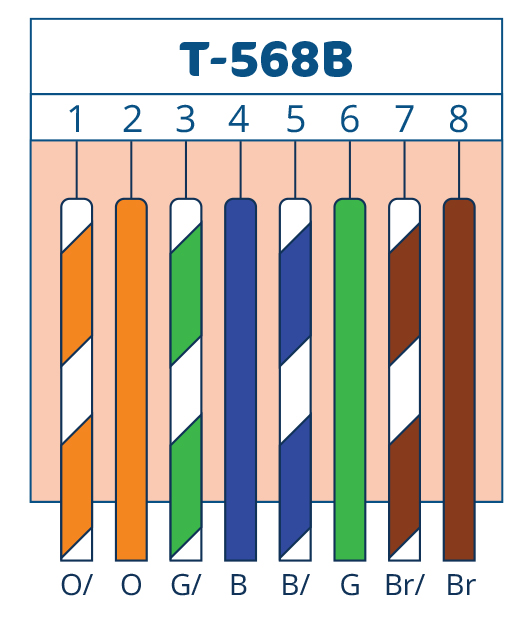
But back to the topic - each room is getting two cables that I put in the fast connector keystones in the wall. The other ends of the cables are all going to the technical point and were terminated with regular RJ45 connectors using some cheap tools that you can get for less than 20EUR. Of course I decided to pursue the golden standard for wiring which is straight-through T568B.
Hardware
[main_switch]
├── [access_point_router]
└── [internet_router]
    └── [homelab_switch]
Main switch
HP ProCurve 1810G
The cables with the RJ45 jacks are all connected here. It is a managed switch and I plan on using its capabilities later to separate IoT (Internet of Things) devices from my main network with VLANs (Virtual Local Area Networks). Apart from that it’s just a switch. A 12-year-old one which I got for less than 15EUR. But it’s brilliant at what it does.
Internet router
ZOWEE 5G CPE 7 (H162-383)
As of now we use it for its 5G module as FTTH (Fiber To The Home) connection is still not ready. Later, it will help us in case of some disturbances as a fallback. It is a nice piece of equipment with 2.5 Gbps LAN connectors and the capability to automatically failover when two Internet connections are available.
Access point router
TP-Link TL-WR844N
Old and trusty TP-Link router which I found in the attic. It supports Wi-Fi 4 (802.11n) with up to 300 Mbps wireless connection bandwidth. Nothing fancy, but totally usable. This one resides on the other floor acting as an Access Point (duh!). I configured it with a different SSID, so in effect I have two different network names in the house, but I have the ability to select the connection which I want by hand. Maybe I will change it later just for the sake of testing or invest in a proper mesh system.
Homelab switch
TP-Link TL-SF1005D
Another piece of equipment that was laying around unused, and for a good reason at that. Despite being newer than the main switch, it only supports up to 100 Mbps on the Ethernet link. As far as I am concerned, it will be there to just have something, but it is first in the line to get replaced with something that will at least support 1 Gbps.
Summary
This article does not have a typical summary as it is more of a journey description than a tutorial like before.
But of course - do not forget to HAVE FUN!